PilotPocket 1.4 is our most feature-packed release yet. We've focused on two things: making the app accessible to pilots across all of Europe, and giving you the real-time data you need before every flight. Here's everything that's new.
12 European Languages
PilotPocket is now fully translated into 12 languages — not just the interface, but everything including your Apple Wallet pass labels. The app automatically detects your device language, and you can switch anytime.
- Deutsch — German
- Français — French
- Español — Spanish
- Italiano — Italian
- Nederlands — Dutch
- Polski — Polish
- Português — Portuguese
- Ελληνικά — Greek
- Suomi — Finnish
- Çeština — Czech
- Dansk — Danish
- English
This includes every screen, every notification, every label on your Wallet pass, and every pre-flight checklist item. If you've been waiting for PilotPocket in your language — it's here.
Real-Time Weather with Fly/No-Go Assessment
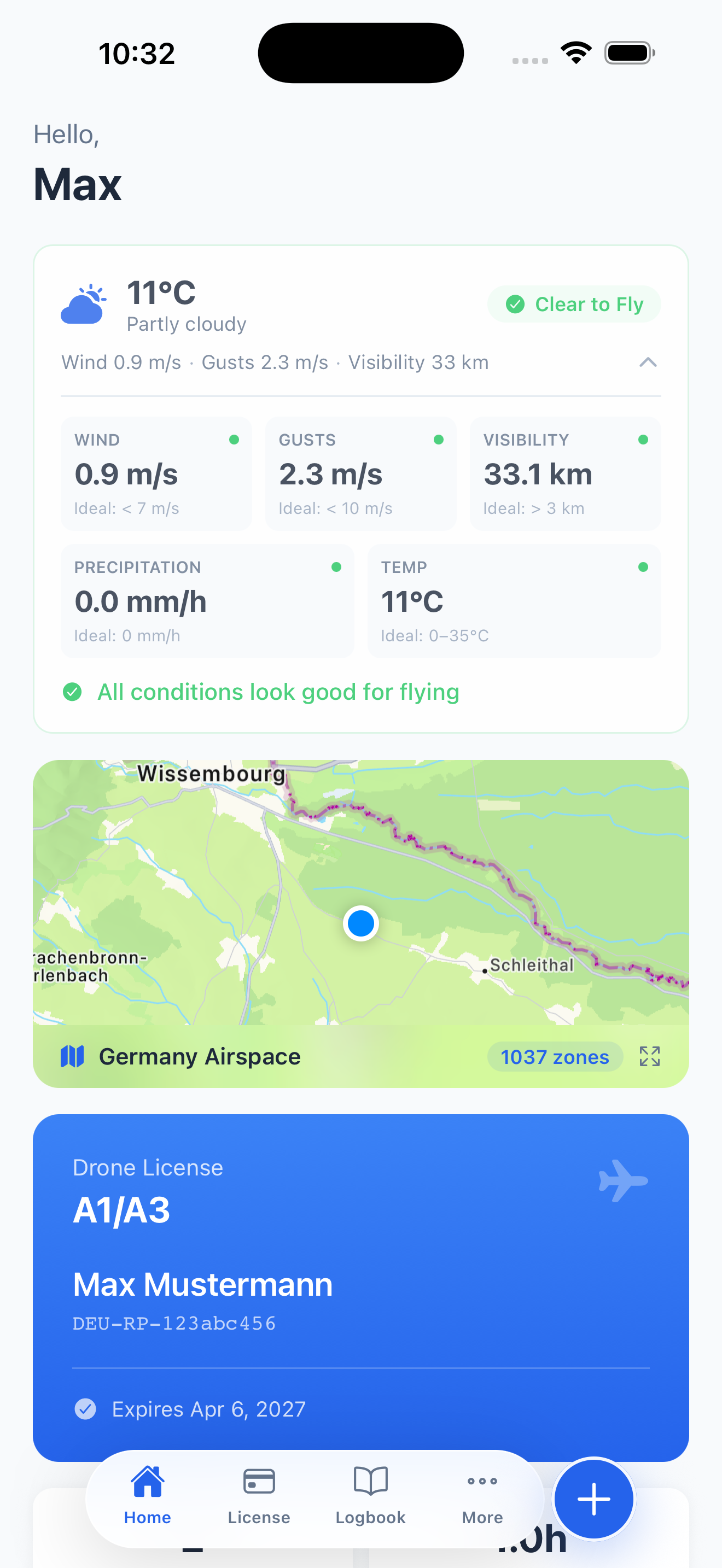
The home screen now shows a live weather widget tailored for drone pilots. At a glance you see:
- Temperature and current conditions
- Wind speed and gusts with ideal-range indicators
- Visibility — critical for VLOS operations
- Precipitation forecast
- A clear Fly / No-Go badge based on all conditions combined
No more switching between weather apps and trying to interpret whether conditions are safe for flight. PilotPocket evaluates the data against drone-specific thresholds and gives you a straightforward recommendation.
Interactive Airspace Map
PilotPocket now includes a full-screen interactive map with airspace data and airport overlays for all EU countries. Tap the map on your home screen to expand it, and you'll see:
- Controlled airspace zones
- Airport locations and proximity
- Your current position relative to restricted areas
- Country-specific zone counts (e.g. "Germany Airspace — 1037 zones")
This is designed for quick pre-flight checks. Before you take off, open the map, verify your location is clear, and fly with confidence. The data covers all 30+ EU and EASA member states.
Flight Statistics Dashboard
Your logbook now has a dedicated statistics view. As you log flights, PilotPocket builds a dashboard showing:
- Hours flown per month — visualised in a bar chart
- Drone usage breakdown — see which drones you fly most
- Top flight locations — your most frequent takeoff spots
- Total flights, total hours, and last flight date — always visible at the top of your logbook
All charts are built with custom SVG rendering — no third-party analytics libraries, no data leaving your device.
Insurance Policy Management
EU drone regulations require liability insurance for most operations. PilotPocket now lets you store your insurance policy details directly in the app, right alongside your drone licenses. Quick access when you need to show proof of coverage — no more digging through email or paper documents.
PDF Export for Your Logbook
You can now export your complete flight logbook as a PDF document. This is useful for:
- Sharing flight history with authorities or clients
- Keeping offline records for compliance
- Backing up your data in a portable format
The export includes all flight details — date, duration, location, drone used, and any notes you've added.
How to Update
PilotPocket 1.4 is available now as a free update in the App Store. If you have automatic updates enabled, you may already have it. Otherwise, open the App Store, go to your Updates tab, and tap Update next to PilotPocket.
If you're new to PilotPocket, it's free to download:
What's Next
We're a small team based in Berlin, and every feature in this update was built based on feedback from real pilots. If you have ideas, questions, or just want to say hello — reach out at contact@drone-eid.eu. We read and reply to every message.